SERNtec
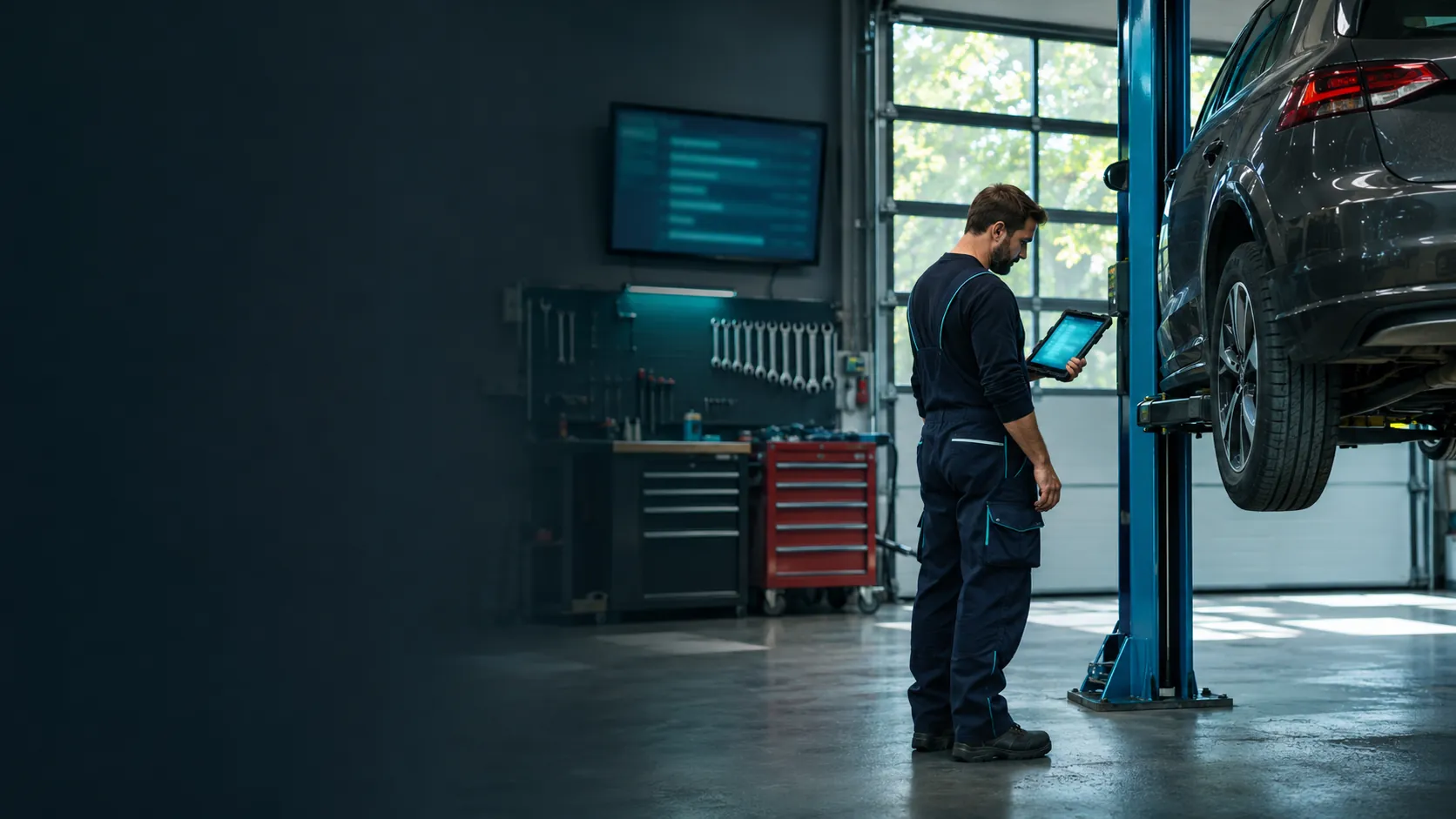
A mechanic checks a job on a tablet next to a car on the lift, a screen with the jobs on the wall behind

AI-generated illustrative image

Light vehicles

Workshop software for cars and vans.

Jobs, bays, parts and tyre storage in one place. For car workshops working on cars, vans and pickups.

How it looks

A workshop day in SERNtec.

Real views from SERNtec, with sample data.

1

See what's on today, first thing.

The overview shows today's jobs, who is in and what is due soon. Whatever is stuck comes first.

  • Jobs today, in progress and waiting for parts
  • Team on duty and free bays
  • Open a job that is due soon in one click
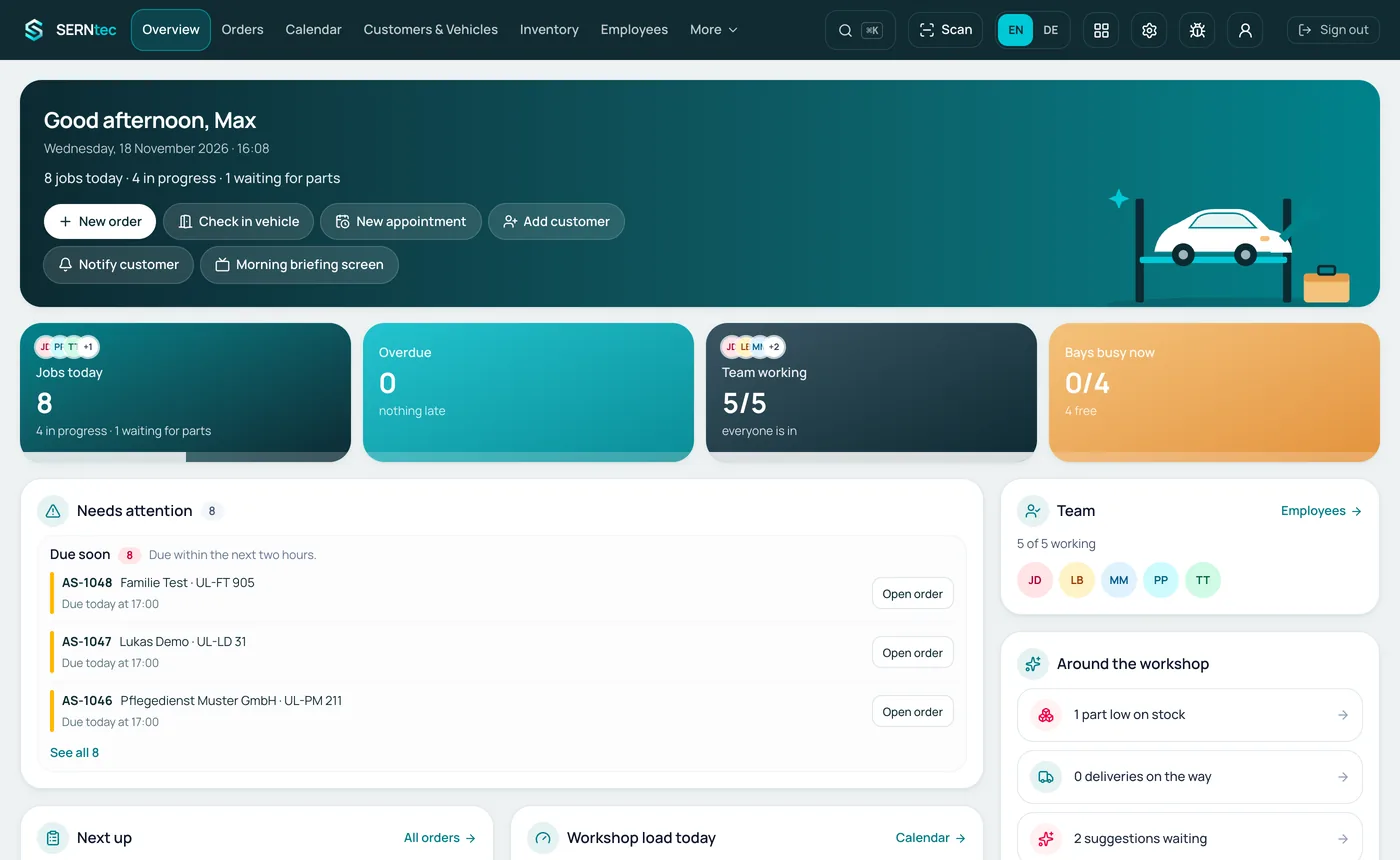
Overview: eight jobs today, four in progress, one waiting for parts, the team on duty
Real view from SERNtec · sample data
2

Every lift, every mechanic in view.

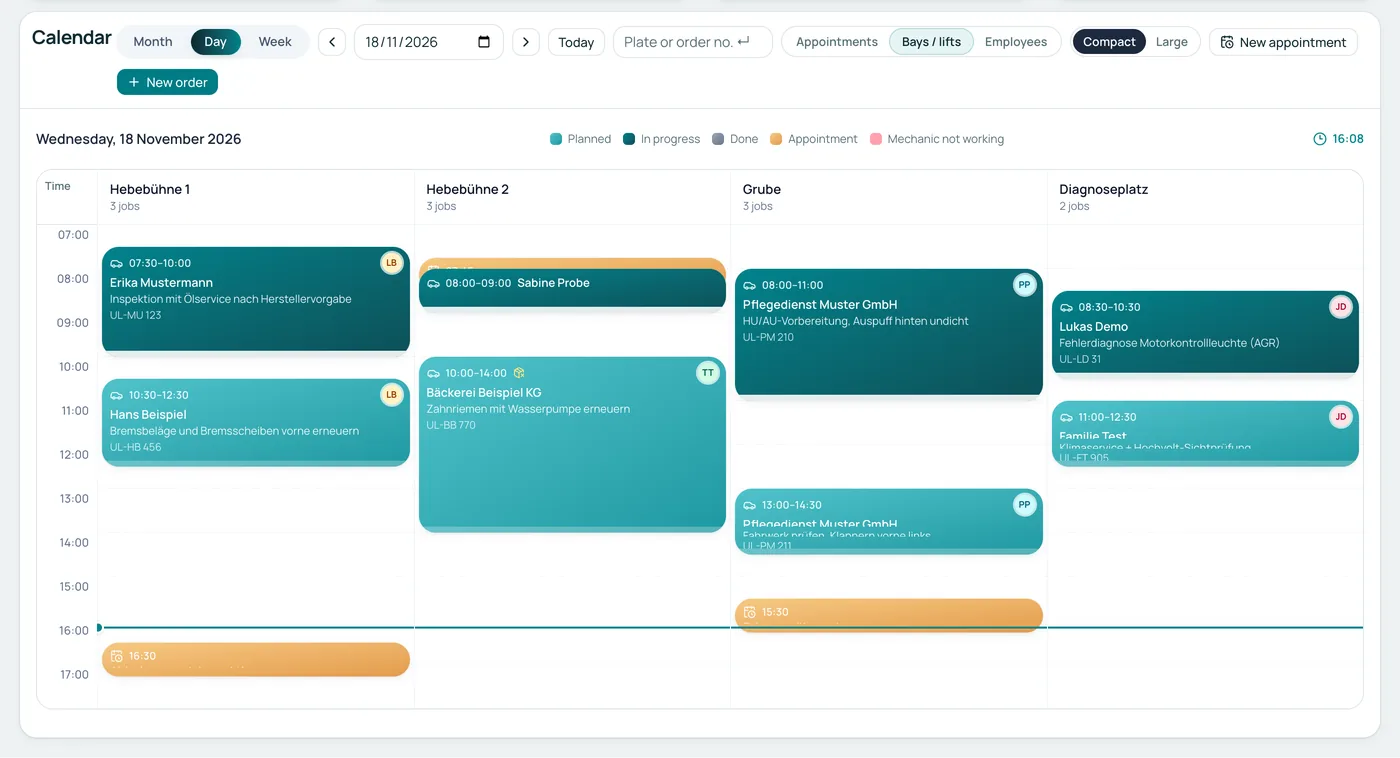
The calendar shows the day by bays and lifts. Each job carries customer, work, plate and mechanic.

  • Planned, in progress and appointments in their own colours
  • View by bays, employees or appointments
  • Day, week and month
Day calendar with lift 1, lift 2, pit and diagnosis bay and the day's jobs
Real view from SERNtec · sample data
3

One job, everything in one place.

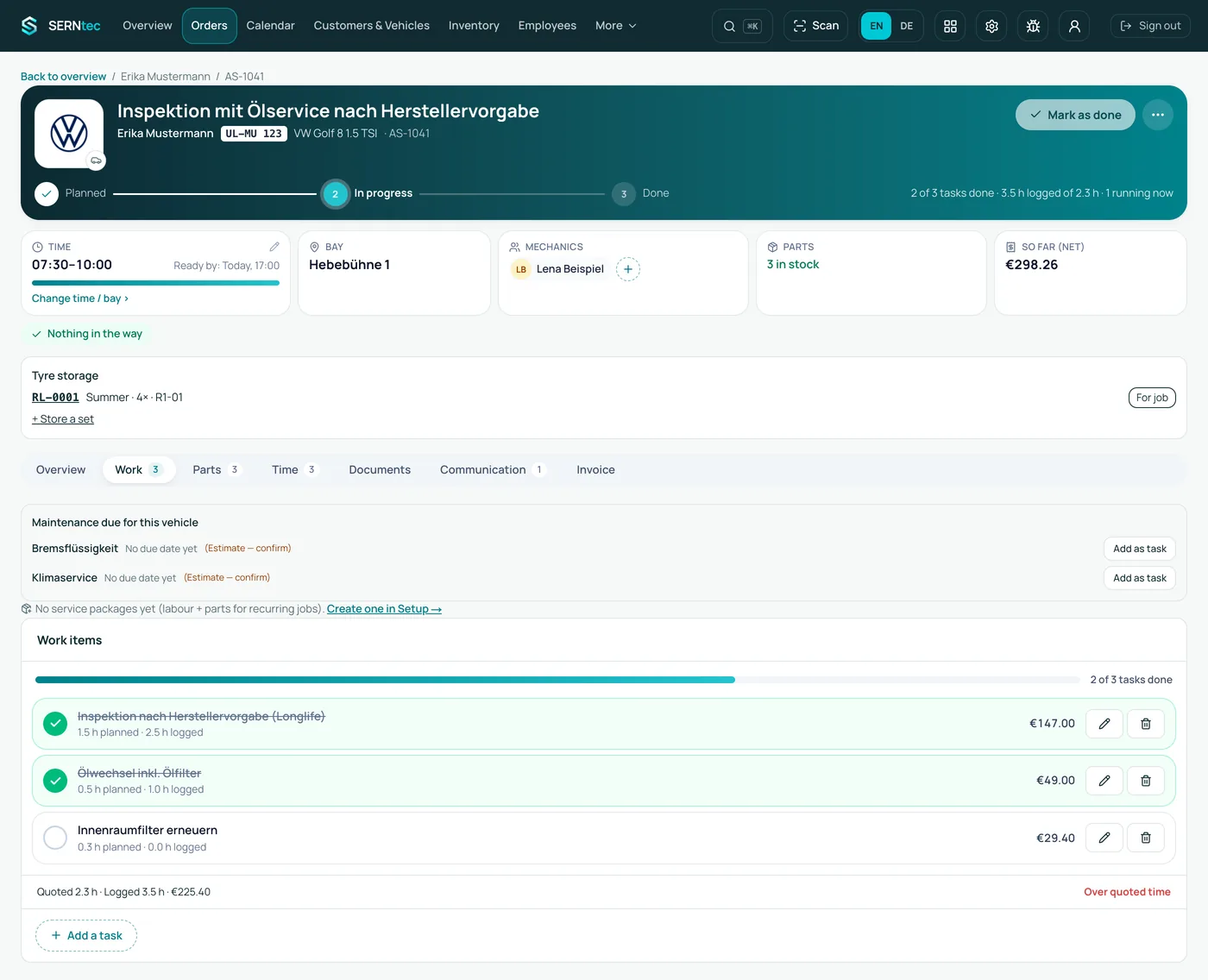
Time, bay, mechanic, parts and the amount so far sit at the top. Below, the work items with planned and logged time and price.

  • Progress from planned to done
  • Logged time against planned time
  • Parts, times, documents and invoice in the same window
Inspection job on a VW Golf: in progress on lift 1, three work items with times and prices
Real view from SERNtec · sample data
4

Tyre storage with place and tread.

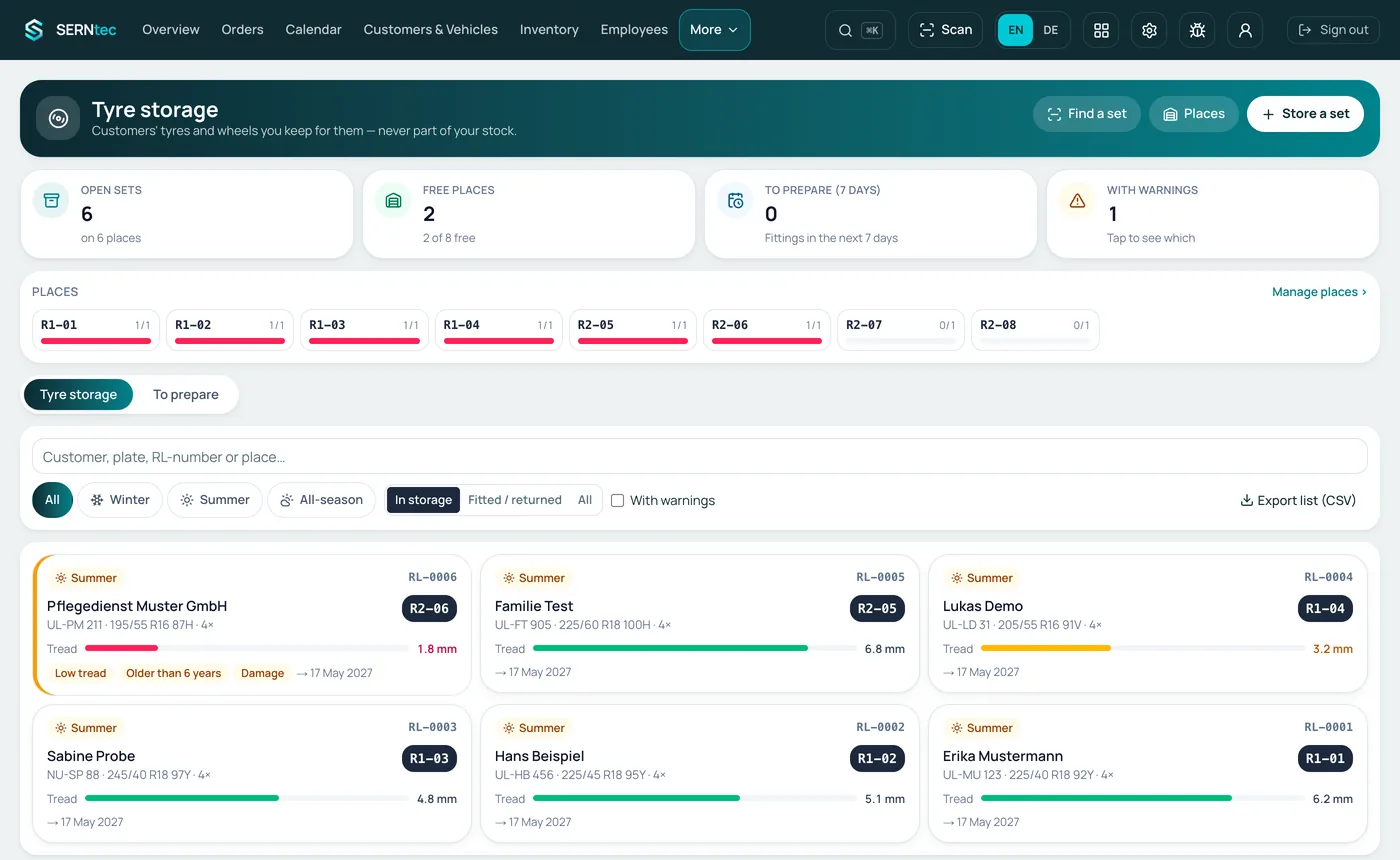
Every stored set has its place, its tread depth and notes. Free places show at a glance.

  • Summer, winter and all-season
  • Notes like low tread or older than six years
  • Export the list as CSV
Tyre storage: six sets on their places with tread depth, one marked low tread
Real view from SERNtec · sample data

Day to day

From planning to the invoice.

  • Planning: who does what, on which bay?SERNtec sorts jobs by bay and mechanic, suggests free bays and suitable people, and you assign by drag and drop. Name your pits, lifts and diagnostics bay as you like.
  • Check-in: record mileage and damage straight awayEnter the mileage at every vehicle check-in. Mark damage on the vehicle drawing, with a photo if you want.
  • Customer and vehicle: history, contacts, inspectionsEvery vehicle has its history, every customer their contact persons. Inspection (HU/AU) reminders are kept with the customer.
  • At the vehicle: time, photos and parts on the jobWorking time, photos and the parts needed are recorded right on the job. The office sees at once how far it has got.
  • Parts and stock: always know where it isEvery part has a storage location and a label, for example “brake disc front ×2, location B-04-2”. Supplier orders and goods receipt in one place.
  • Labour units (AW): bill by standard timeEnter labour units (AW) right on the job. Billing uses AW and your hourly rate, no maths by hand.
  • Free choice of supplierYou choose the supplier: own stock, supplier catalogues or manual entry. No tie to a single supplier.
  • Counter sales with a till (option) Coming soonSell parts, accessories and small items at the counter through the till in SERNtec, in the same system as jobs and stock. For cash sales the till starts with the TSE connection (German fiscal device), which is being introduced. Choose any receipt printer.
  • Tyre storage: every set in its placeTyre sets are stored with a storage slip by QR code and are easy to find again.
  • Quotes and invoicesWrite quotes right in the system. Create the invoice as XRechnung or ZUGFeRD at the push of a button. Once issued, an invoice can no longer be changed, one of the GoBD requirements.
  • DATEV export for accountingExport your data in DATEV format for your tax adviser and your accounts.
  • Field service as an add-onJobs away from the workshop with travel time and kilometres. For car workshops, field service is an add-on.
  • Reports, leave and payrollYour figures at a glance. Absences and payroll preparation in the same system.
  • Who sees whatPermissions per person: mechanics see their jobs, the office sees billing.

Communication

Who knows what?
It's all on the job.

Mechanics, purchasing and the foreman see the same status. No shouting across the hall, no notes, no chasing.

  • The problem“I still need a part, but purchasing only finds out when someone asks.”The answer in SERNtecMechanic to purchasing. The mechanic adds the missing part right on the job. Purchasing sees it at once.
  • The problem“The part only arrives on Thursday, and the foreman hears about it too late.”The answer in SERNtecPurchasing to foreman. Order status per part on the job: requested, ordered, delivered. A delay stands out to the foreman straight away.
  • The problem“The job was rescheduled, and the mechanic is standing at the wrong vehicle.”The answer in SERNtecForeman to mechanic. The new plan shows up on the mechanic's tablet or phone; it updates by itself.
  • The problem“An extra fault turns up during the work, but nobody reaches the customer.”The answer in SERNtecMechanic to office and customer. The mechanic adds a photo and a note to the job. The office turns it into a quote for the customer.
  • The problem“Nobody likes writing things down with dirty hands.”The answer in SERNtecMechanic to the job. Dictate notes and parts by voice, straight into the job.
  • The problem“Who did what yesterday?”The answer in SERNtecForeman to everyone. History on the job: working time, photos, parts and notes with name and time.

AI in the workshop

AI takes over the typing.
You stay in control.

We use AI in a few specific places, such as reading delivery notes and vehicle registration documents. You check the recognised data before it is saved. Delivery notes and registration documents are read on SERNtec's own servers in Germany, without an external AI service.

  • Read delivery notesTake a photo of the delivery note; SERNtec reads parts and quantities and suggests them for goods receipt. You check and confirm.
  • Read registration documentsPhotograph the vehicle registration document; the vehicle data is recognised and entered on the vehicle. No typing at check-in.
  • Speak instead of typeNotes, parts and meter readings by voice on the job, even with dirty hands. This uses your browser's speech recognition.

Differences

Cars or commercial vehicles?
What differs.

At sign-up you choose what you mainly repair. SERNtec then adapts vehicle types, fields and maintenance. More on the commercial vehicle workshop.

What differs by workshop
Cars & vansTrucks, buses & machines
Vehicle typesCar, van, pickupTruck, bus, trailer, tractor, forklift, telehandler, construction machines (e.g. excavator, wheel loader)
MeterKilometresKilometres – and operating hours for machines
MaintenanceInspection (HU/AU) reminderplus intervals by operating hours
Vehicle dataPlate, HU/AU, historyplus axles, weight, fleet and serial number
Work on siteField service as an add-onField service on by default: location, travel time, km
Bays & placesPits, lifts, diagnostics bay – named freelythe same – named freely, e.g. “truck pit”

The same for both: planning, vehicle check-in, parts & stock, quotes and invoices.

Questions

Frequently asked questions about the car workshop.

Does SERNtec run in the browser?

Yes. SERNtec runs in the browser on PC, tablet and phone. There is nothing to install.

Where is my data stored?

On Hetzner servers in Germany, transferred with SSL encryption. It is visible only to your business and can be exported at any time.

Can I create e-invoices?

Yes, as XRechnung or ZUGFeRD, straight from the job.

Is there tyre storage?

Yes. Tyre sets are stored with a storage slip by QR code and can be found again at any time.

More products

All three products can be combined in one software.

For example workshop and rental in one system, plus counter sales with a till as an option.

Get started

Try SERNtec in your car workshop.

Create an account, add your bays and staff, plan your first job. Or see it running in Ulm.

Newsletter

News from SERNtec

New features and tips for your workshop, by e-mail.